Living
frontends.
Codex can generate or assemble the component that fits the task instead of returning every answer in a fixed page or block of text.
Frontends on demand
A responsive page still decides the interface in advance. With Codex, the useful component can be created for the task in front of the user, and the method for creating it can live in a reusable skill.
Design the screens first
The product team decides the layout, components, and states before the user arrives.
Build for the current task
Codex can turn the available material into a table, map, timeline, configurator, or visualization.
Let people explore
The user can change an input, inspect a state, compare options, or act on the result instead of only reading it.
Examples
Each example starts from a familiar job and uses interaction where it adds useful control or understanding.
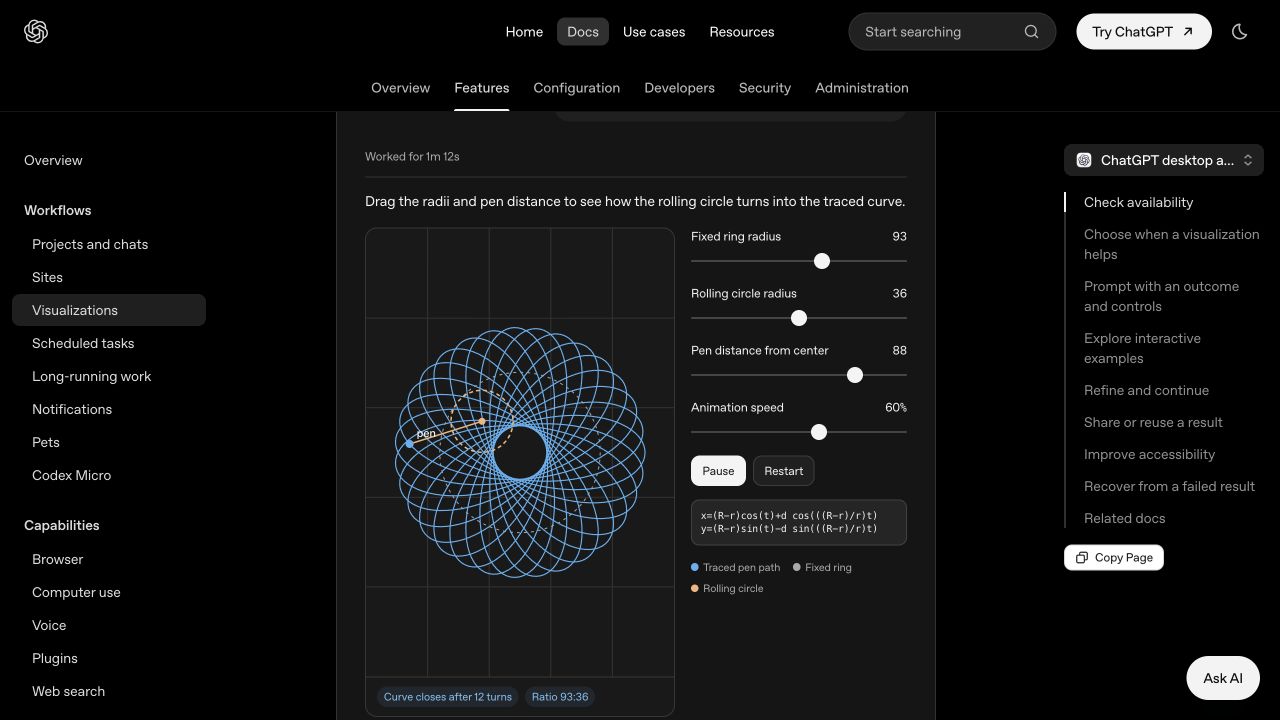
The answer is an interface, not a static chart. Change the inputs, move the probe, or inspect the tokens and the explanation responds right away.
Skills for interactive frontends
Create a reusable screenshot-to-component workflow, then use it to build a short product tutorial from real interface references.
Create the skill
Package the project context, design-system reuse, accessibility, responsiveness, and verification checks so the workflow can be used again.
Use $skill-creator to make a skill called screenshot-to-component for the User Insights project. The idea is that when I give Codex a screenshot, it should recreate that UI as an editable React illustration.
Before it builds anything, it should look through the User Insights code and reuse the actual components, styles, tokens, and icons from the site so the result feels like part of the product instead of something copied from scratch. It should build real UI rather than putting the screenshot on the page, and the result should be responsive, accessible, and easy to edit. Put the skill in user-insights/skills/screenshot-to-component, test it with one real screenshot, and run the project's typecheck and build commands.
Test it on a real page
Attach the Insights, Audience growth, and Geographic users screenshots, then build the tutorial without restating the workflow.
Build a simple tutorial webpage that explains how to use the User Insights dashboard. Use the screenshot-to-component skill for each screenshot I attach.
The page is for a new teammate learning the product. Make it a clear editorial walkthrough, not a marketing page, dashboard clone, or slide deck.
Organize the page into three steps:
01 — Insights
Introduce the overview and show how someone identifies the most important signals first.
02 — Audience growth
Explain how to read audience change over time and compare the available periods.
03 — Geographic users
Explain how to use the globe, region controls, and country view to understand where users are active.
Use a calm vertical narrative with:
- A short introduction.
- Visible step numbers and concise explanations.
- One substantial screenshot-derived illustration per section.
- Simple anchor navigation so people can move between the three steps.
What to turn into a skill
Choose frontend work your team repeats. Keep the method stable, pass in new material, and generate a component that still follows the project's design system.
Product screenshots
Rebuild a reference as an editable, responsive illustration that feels native to the product.
Data and comparisons
Turn changing inputs into a view people can filter, inspect, and compare.
States and flows
Generate a focused component that demonstrates a sequence, configuration, or edge case.
Team patterns
Package design-system and verification rules so anyone can produce the next component consistently.